


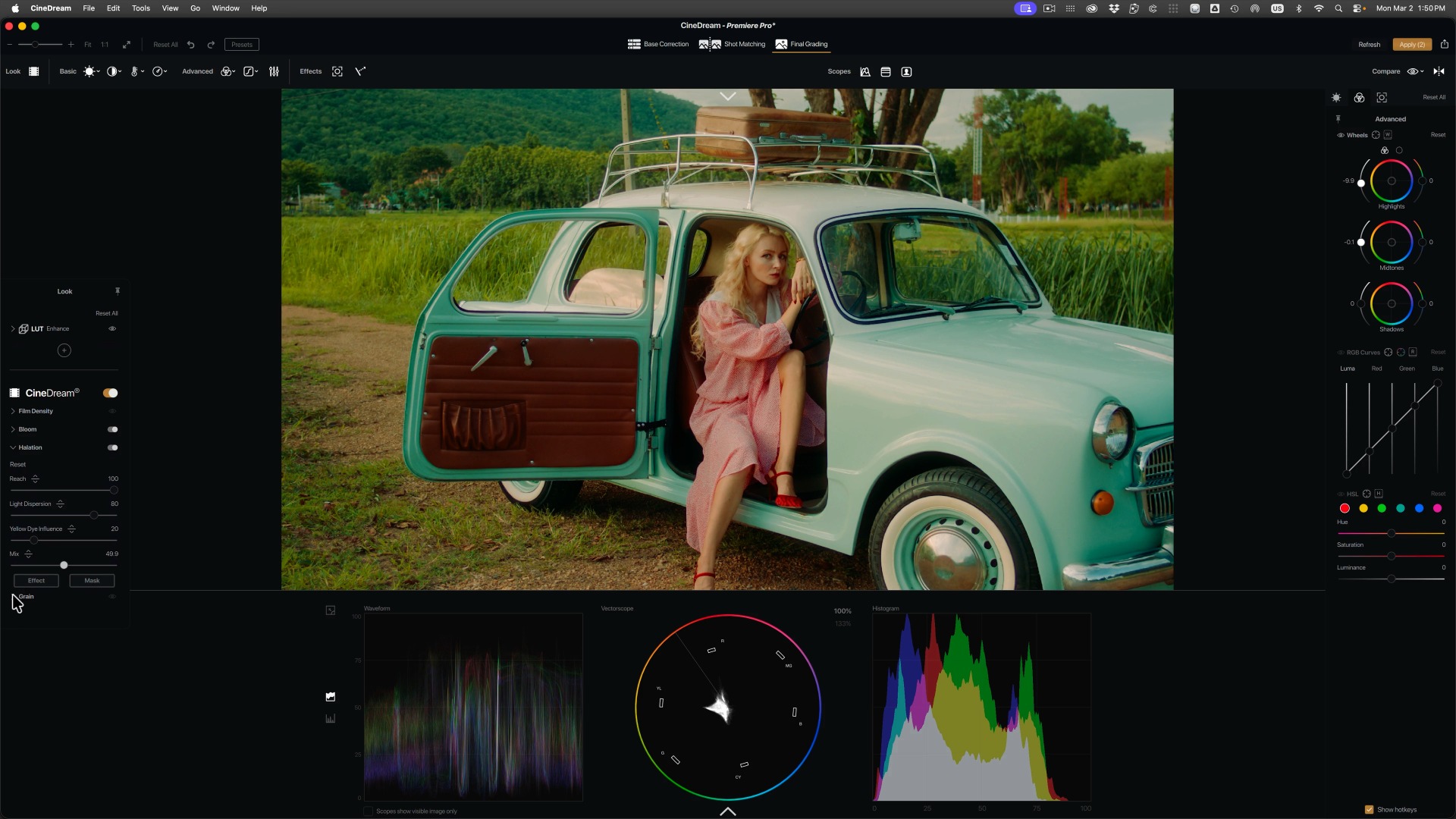
CineDream, the point-and-click color grading tool from Color Finale creator Denver Riddle, is now available as native plug-ins for Adobe Premiere Pro, After Effects, Final Cut Pro, and DaVinci Resolve. The release puts the same ACES 2.0-based pipeline and direct on-image grading into all four hosts, with no round-trip to a separate grading application. For editors who have long treated color management as an afterthought in their NLE, this release targets exactly that gap.
The plug-ins bring the full CineDream toolset into each host: camera and input profile selection for Log and non-Log footage, ACES 2.0-based color management under the hood, and controls for exposure, skin tone, density, contrast, film color, halation, bloom, highlight rolloff, and grain, all adjusted directly on the image. Supported versions are Premiere Pro 2025 or later, After Effects 25.0 or later, DaVinci Resolve 20 or later, and Final Cut Pro 11.1 or later. Premiere Pro, After Effects, and Resolve are covered on both macOS and Windows, while Final Cut Pro is naturally macOS only. The same license extends to Photoshop and Lightroom, plus a standalone mode for grading JPG, PNG, and TIFF stills.
A managed pipeline instead of LUT stacks
CineDream’s core idea is to replace the usual chain of creative LUTs with a color-managed foundation. You tell the plug-in what your footage is (the developer lists Sony, Canon, Panasonic, Blackmagic, ARRI, RED, and DJI Log profiles, alongside plain Rec709 material), and it converts everything into its ACES 2.0-based working pipeline before any look is applied. According to the company, this is what keeps skin tones and shot matching predictable across mixed cameras, since every clip enters the film-look stage from the same starting point.
The timing fits a broader industry pattern: ACES 2.0 adoption is picking up, with ARRI’s Film Lab plug-in also listing ACES 2.0 support as in development. What CineDream adds on top is the promise that users never have to touch the underlying color science; the ACES transforms stay hidden behind a guided setup.
The Premiere Pro angle
The Premiere Pro plug-in might arguably be the most interesting of the four. Adobe’s NLE has a large user base, and while its built-in color management has improved over recent versions, working in ACES inside Premiere has never been a comfortable <a href="https://cinemamix360.com/2026/09/12/music-student-amps-up-audio-production-experience-with-rock-roll-hall-of-fame-internship/” title=”Music student amps up audio production experience with Rock & Roll Hall of Fame internship”>experience. CineDream drops its managed pipeline directly into that workflow: choose the camera profile on the clip, then grade on the image without leaving the timeline.
For DaVinci Resolve users, the calculus is different again, since Resolve ships with full color management and a node-based grading environment. There, CineDream positions itself as the faster, simpler route for editors who stay on the edit page and never open the color page at all.
Grading directly on the image
Instead of color wheels and curves in an inspector panel, CineDream’s headline interaction is what the developer calls Click and Grade: you click and drag directly on the image to shape exposure, skin tone, and the overall look. Built-in false color and a skin tone guide handle the technical checks, while batch and match tools carry a grade across clips at project level. A LUT preview and mix function remains for anyone who still wants to audition existing looks on top of the managed pipeline.
The film character tools cover the now-familiar analog territory of halation, bloom, grain, density, and highlight rolloff, with four film-inspired emulations to choose from. Demand for this category has been growing steadily; when Color.io shut down last December, its halation and grain simulation were the features users mourned most. Everything is GPU-accelerated, though the developer’s own FAQ concedes that grain, bloom, and halation are the heavier effects and may require reduced viewer quality or rendered previews on slower machines.
A familiar name behind the tool
Denver Riddle needs little introduction to long-time Final Cut users: his original Color Finale plug-in gave FCPX proper color wheels years before Apple built its own, and the tool later grew into the Color Finale 2 Pro grading suite we covered previously. (Denver is no longer involved with, or a product owner of Color Finale). CineDream takes a different approach: less a colorist’s toolbox, more a guided workflow for editors who never wanted to become colorists in the first place.
Whether the guided approach holds up on demanding material is something each user will have to judge on their own footage; the free demo includes every feature and only adds a watermark on export, which makes that test easy to run. There is also a demo video walking through the workflow.
Price and availability
CineDream is available now from the CineDream website. The annual license costs $99 per year, while the perpetual license is $249 one-time and includes 30 months of updates and support, with an optional $49 per year extension afterwards. A single license activates on up to two computers. On the Mac, the plug-ins require macOS 13.4 or later and 16 GB of RAM, with Apple silicon integrated GPUs supported; Intel Macs need a discrete AMD GPU with 4 GB of VRAM. On Windows 10 or 11, the developer asks for 16 GB of RAM and a dedicated GPU of NVIDIA GeForce 1060 class or better (CUDA 6.1+), an AMD Radeon RX 6600, or a Radeon Pro W5500 or better, with current drivers.
Would you grade with a guided plug-in inside your editing app, or do you prefer building your own pipeline? Don’t hesitate to let us know in the comments below!
