


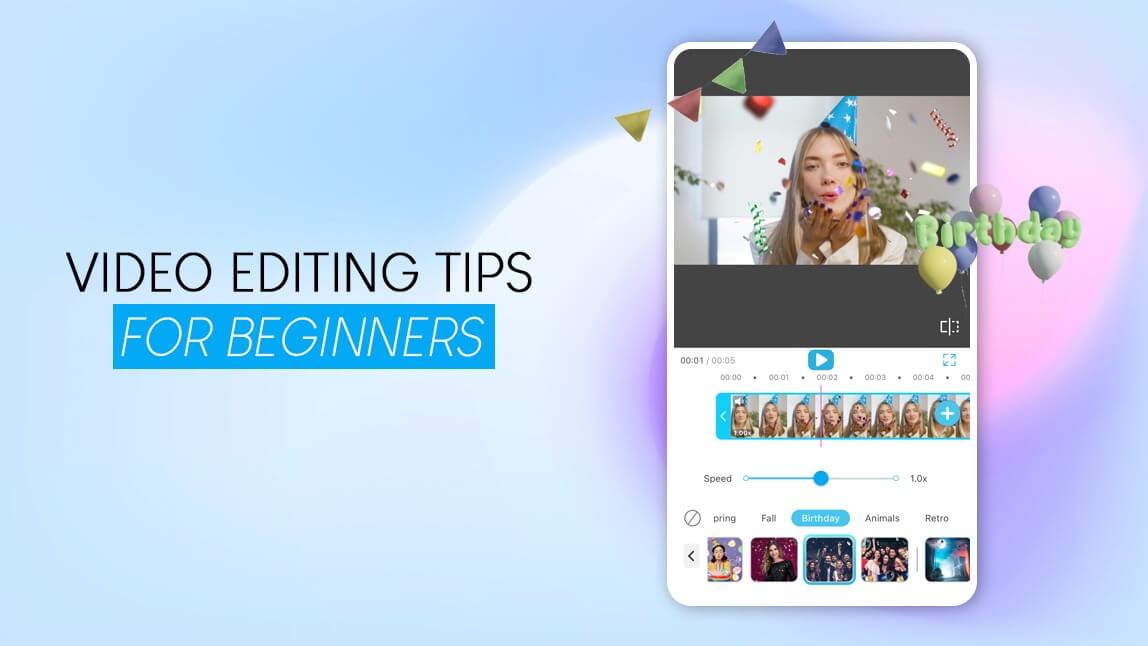
The fastest way to make any video look professional is to combine three things at once: cut on an emotional or visual beat roughly every three seconds, keep audio levels balanced under every scene, and hold one consistent color tone across all your clips. Editing is the invisible language that shapes how people feel time.
Video editing is where footage becomes story, where rhythm meets psychology, and where your creative fingerprint is born. It’s not just about trimming clips or adding transitions. It’s about deciding how your audience experiences emotion second by second.
- Video editing transforms basic clips into engaging stories that hold attention.
- A good edit balances visuals, sound, and pacing for an immersive viewer experience.
- You don’t need complex software—easy video editing apps like YouCam Video can help you create professional results in minutes.
- Small details like transitions, sound balance, and color correction make a huge difference.
The Science Behind Why Viewers Stay (or Scroll)
YouTube’s 2025 Creator Insider report showed that over 70 percent of viewers decide whether to keep watching within 5 seconds.
Eye-tracking studies by the Nielsen Norman Group reveal that modern audiences visually re-scan screens every 2.8 seconds, essentially validating the famous 3-second rule of video editing.
That means: if nothing new happens within ≈ 3 seconds — a motion, sound, text cue, or emotional shift — attention drops. Editing, therefore, isn’t decoration. It’s neuroscience.
“I spend about an hour editing every minute of finished footage, but that’s when the story really comes alive.”
That single Reddit comment captures the truth every pro knows: editing creates emotion, not footage.
Chapter 1 – Story First: The Foundation of Every Edit
Before you touch a timeline, you need a story. A timeline without purpose is just noise; a story turns noise into music.
1.1 The Three-Act Structure: The Oldest Trick in the Book
Every memorable video — whether a 10-second TikTok or a 10-minute vlog — secretly follows the three-act formula:
| Act | What Happens | Editing Focus |
|---|---|---|
| Act I – Setup (The Hook) | Introduce the situation fast; spark curiosity. | Open strong: bright color, clear subject, bold text overlay, or sound cue. |
| Act II – Confrontation (The Journey) | Show process, challenge, or discovery. | Keep rhythm dynamic; alternate wide + close shots; use J-cuts for flow. |
| Act III – Resolution (The Payoff) | Deliver emotion or insight. | Slow the pacing; fade music; end on satisfaction. |
The beauty of this structure is that it scales. Even 15-second Reels can apply it: Hook (0-3 s) → Journey (4-10 s) → Payoff (11-15 s).
1.2 Case Study – Turning a Vlogger’s Footage into a Story
Let’s look at a real example.
Before:
A travel vlogger uploads a 5-minute Bali montage: random clips of beaches, food, and scooters. Views: 823, average watch time ≈ 17 seconds.
After applying story structure:
- Act I: 3-second drone shot of turquoise water + caption “I quit my job and flew here.”
- Act II: Fast-paced cuts of markets, wrong turns, laughter, and one missed bus.
- Act III: Slow-motion sunset, voice-over line: “Maybe peace isn’t a place — it’s a decision.”
Results: 48 000 views, 78 % retention, hundreds of comments.
The clips didn’t change, the editing logic did. Story order = viewer emotion.
1.3 The Kuleshov Effect: Emotion by Juxtaposition
Early filmmaker, Lev Kuleshov, proved that viewers derive meaning not from single images, but from their sequence.
He showed an actor’s neutral face followed by:
soup → audience = “he’s hungry”
coffin → “he’s grieving”
child → “he’s loving”
The face never changed; the edit did.
Every modern cut you make carries that same power.
A smile → crash cut → dark street = suspense.
Smile → cut → puppy = warmth.
Editing is emotional algebra.
1.4 Storyboard & Shot List: The Blueprint for Flow
Great editors pre-visualize. Here’s a simple storyboard layout you can copy into Notion or Google Sheets:
| Scene # | Shot Type | Duration (s) | Purpose | Emotion | Audio Cue |
|---|---|---|---|---|---|
| 1 | Wide (Establishing) | 3 | Show location | Curiosity | Ambient sound |
| 2 | Medium (Host) | 4 | Introduce story | Trust | Voice-over |
| 3 | Close-Up | 2 | Detail moment | Focus | Music beat |
| 4 | POV | 3 | Viewer immersion | Excitement | Rising beat |
1.5 The Hook Map – Your First Five Seconds
The first 5 seconds decide everything. According to YouTube Analytics 2025, videos with visual motion in frame + text overlay within 3 seconds average 38 % higher retention.
Use this simple “Hook Map”:
| Second | What Viewer Sees | Emotion Triggered |
|---|---|---|
| 0–1 | Motion / camera move / color flash | Curiosity |
| 1–2 | Text or subtitle prompt | Clarity |
| 2–3 | Facial reaction or voice | Connection |
| 3–5 | Mini payoff (tease result) | Commitment |
Combine motion + message + emotion. Then earn the next 30 seconds with story.
1.6 Emotional Intent: The Question Every Cut Must Answer
Before making any edit, ask yourself:
“What emotion am I trying to create here?”
If you can’t answer in one word (curiosity, excitement, tension, calm), the clip probably doesn’t belong.
Professional editors make hundreds of micro-decisions based on this one filter.
When in doubt, cut it out.
“Plan your transitions before you film. It saves me hours.”
1.7 Common Beginner Mistakes (and How to Fix Them)
| Mistake | Why It Hurts | Solutions |
|---|---|---|
| Random clip order | Confuses viewers | Drag clips to color-coded timeline |
| Overusing transitions | Looks distracting | Keep simple cuts; use one consistent fade |
| No audio plan | Feels flat or noisy | Balance music + dialogue with AI Audio Ducking |
| Inconsistent color | Breaks immersion | Apply same LUT / filter to all shots |
“Stop obsessing over plugins. Serve the story first.”
1.8 Mini Checklist – Before You Start Editing
- Write your 1-sentence story summary.
- Label your footage by act.
- Decide the emotions for each scene.
- Plan the hook (visual + text + sound).
- Back up your raw files (yes, the 3-2-1 Rule starts here).
Do that, and editing becomes a creative conversation, not a guessing game.
Chapter 2 – How to Do Good Video Editing
So you’ve planned your story, organized your clips, and built your hook. Now it’s time to edit like a pro.
“Good video editing” isn’t defined by flashy transitions or expensive software. It’s the art of directing attention, controlling emotion, and respecting time.
You can think of video editing as invisible design, every cut, sound, and motion cue guides what your viewer feels without them noticing it.
2.1 What “Good” Really Means in Editing
Let’s get one thing straight: Good editing is invisible.
If someone says, “Wow, cool transitions,” that means the edit pulled attention away from the story.
If someone says, “That felt amazing,” that’s when you’ve nailed it.
In other words:
Good editing doesn’t show off, it flows.
That’s why every great editor, from YouTubers to film pros, follows five unspoken rules:
| Rule | Why It Matters | How to Apply |
|---|---|---|
| 1. Serve the Story | Each cut must move emotion or logic forward. | Ask: “Why is this clip here?” |
| 2. Match the Beat | Visuals should harmonize with rhythm. | Align key motion with sound hits. |
| 3. Respect Viewer Time | Every second matters. | Cut ruthlessly; apply the 3-Second Rule. |
| 4. Maintain Continuity | Keep spatial and emotional flow. | Don’t break direction or tone. |
| 5. Polish Audio & Color | Aesthetic and mood consistency build immersion. | Balance levels, apply unified filters. |
2.2 The Amateur vs. Professional Mindset
A Reddit thread summed this up perfectly:
“Beginners try to make every second look cool. Professionals make every second mean something.”
That’s the difference between activity and intention.
| Editing Stage | Amateur Approach | Professional Approach |
|---|---|---|
| Goal | Assemble clips chronologically | Craft emotion-driven narrative |
| Transitions | Use every effect available | Use only story-motivated cuts |
| Audio | Add trending song | Build soundscape: dialogue + ambience + SFX |
| Pacing | Cut randomly | Adjust tempo to emotion |
| Color | Apply random LUTs | Match tones across all shots for cohesion |
Once you internalize that, your editing instantly matures.
2.3 The 5-Step Framework for Doing Good Video Editing
Editing is overwhelming only when it’s unstructured. Here’s a pro workflow, five clean steps from raw to refined.
🧩 Step 1: Organize Your Materials
Start with order.
Rename your clips: “Scene1_Intro,” “Scene2_Broll.”
Import assets (music, overlays, subtitles) before you start cutting.
Why it matters:
Organization = creativity without chaos. You’ll spend your time editing, not searching.
✂️ Step 2: Build Your Assembly Cut
An assembly cut is your first “everything included” draft.
Lay clips in story order, no trimming yet.
In YouCam Video:
Tap + Add Clip → select your sequence.
Arrange with drag & drop on the timeline.🎯 Pro Tip:
Turn off background music temporarily. Focus on emotional flow, not rhythm yet.
🎛️ Step 3: Create the Rough Cut (The Heart of the Process)
Now comes storytelling in action.
Trim each clip to the emotionally necessary moment.
Follow the 3-Second Rule: Add a new visual or sound cue every ≈3 seconds.
Add J-cuts and L-cuts for seamless transitions (audio leads or trails visuals).
Example:
Someone laughs → audio continues while you cut to their friend’s reaction.
That’s an L-cut, and it makes the moment feel alive.
If it peaks early, cut there. Don’t wait for the clip to end naturally.
“Cut when the energy drops, not when the clip ends.”
🎨 Step 4: Polish the Experience — Color & Sound
Professional editors call this “finishing.”
- Use the AI Music Generator to create royalty-free background tracks.
- Enable Auto Ducking to automatically lower music when someone speaks.
- Add ambient layers (wind, café noise, footsteps) under dialogue, it creates realism.
- Hit Adjust → Auto Enhance to balance brightness and contrast.
- Apply one consistent LUT or filter (Cinematic, Natural, Vintage).
- Reduce Saturation slightly for a “film look.”
- Keep skin tones natural, don’t over-edit.
| Tone Type | When to Use | Filter Idea |
|---|---|---|
| Warm (orange/gold) | Travel, food, cozy lifestyle | “Golden Hour” |
| Cool (blue/teal) | Tech, urban, emotional | “Frost” |
| Neutral | Tutorials, product demos | “Clean Pop” |
🎯 Keep color consistent across all clips, a common rookie mistake is mixing warm indoor clips with cool outdoor shots, which breaks immersion.
🚀 Step 5: Final Cut & Fine Details
This is where “good” becomes great.
Checklist before you export:
- ✅ All clips serve the story
- ✅ Audio balanced (no clipping, no peaks)
- ✅ Color consistent
- ✅ 3-Second Rule observed
- ✅ No abrupt cuts or dead air
- Captions or on-screen text (use the “Title” tab).
- Simple transitions (Fade, Cross Dissolve).
- Music fade-out synced with the emotional resolution.
2.4 YouCam Video Workflow: From Idea to Publish
Let’s run through a complete example workflow using YouCam Video.
| Stage | What to Do | Feature Used | Result |
|---|---|---|---|
| 1. Import | Select 5–7 clips | Batch Import | Organized timeline |
| 2. Auto Enhance | Adjust lighting instantly | AI Video Enhance | Clear, balanced visuals |
| 3. Cut & Pace | Trim dull parts | Split & Speed Tools | Snappy, pro rhythm |
| 4. Add Music | Generate custom beat | AI Music Generator | Royalty-free soundtrack |
| 5. Fine Tune | Adjust color & captions | Adjust, Add Text | Cohesive, branded feel |
| 6. Export | Optimize for platform | Export Presets | Perfect format every time |
That’s a full workflow, achievable from your phone in under 30 minutes.
2.5 Applying the 3-Second Rule Inside an Actual Edit
The 3-Second Rule isn’t a gimmick, it’s neuroscience.
A 2025 Adobe Creative Cloud study found that attention span for mobile video drops sharply after 2.7 seconds if no change occurs.
These helps you adapt this rule intuitively:
- Every 3 seconds, do something new: cut, zoom, add overlay, or move text.
- Use Motion Stickers or Zoom Effects sparingly. one per shot max.
- Create visual waves:
0–3 s = action,
3–6 s = reaction,
6–9 s = reflection (close-up or pause).
Example sequence:
0:00–0:03 – Wide shot (establish scene)
0:03–0:06 – Medium shot (subject action)
0:06–0:09 – Close-up (detail emotion)
0:09–0:12 – Reaction shot (connection)
Each shot earns attention. Together, they create rhythm.
2.6 The “Rookie vs Pro” Checklist
| Aspect | Rookie Mistake | Pro Practice |
|---|---|---|
| Timing | Lets clip run until it “feels done.” | Cuts on motion or emotion peaks. |
| Audio | Music louder than voice. | Music ducked under dialogue. |
| Color | Random LUTs applied. | Single tone matched to brand mood. |
| Structure | No clear arc. | 3-act narrative visible in timeline. |
| Tools | Overuses effects. | Uses minimal, purpose-driven edits. |
When in doubt,less is more.
2.7 Common Problems & Quick Fixes
Problem 1: My video feels boring halfway through.
➡ Fix: Re-apply the 3-Second Rule; introduce a new camera angle, sound cue, or text overlay.
Problem 2: My transitions look amateur.
➡ Fix: Use simple cuts. Save flashy transitions for scene changes, not within scenes.
Problem 3: My audio sounds “off.”
➡ Fix: Normalize volume and remove background hum with Noise Reduction filter.
Problem 4: My color looks inconsistent.
➡ Fix: Duplicate your preferred “look” from one clip and paste settings across others.
2.8 Timing & Rhythm: The Hidden Music of Editing
Editing isn’t about timecode, it’s about tempo.
Think of your timeline like a song:
Verse = setup (slow)
Chorus = peak (fast)
Bridge = reflection (pause)
Beat Sync mode visually marks music beats, helping you cut perfectly to rhythm.
This is how pro editors create that satisfying “snap” in every transition.
🎧 Bonus tip: If you can nod your head to your cut, your pacing is right.
2.9 When “Good” Turns Into “Great”
You know your edit is ready when:
- You can watch it start to finish without skipping ahead.
- You forget about the cuts, you just feel the story.
- Every frame earns its place.
And as Reddit editors often say: “If it feels right, it probably is right. Your gut is your best editing tool.”
Chapter 3 – Mastering Pacing & Rhythm
3.1 Why Pacing Is Emotion
Pacing isn’t speed, it’s emotion control. Every viewer subconsciously syncs their breathing and heartbeat to your edit. That’s why a jump cut feels like a gasp and a slow pan feels like an exhale.
📊 YouTube Analytics 2025: average retention drops 42% between seconds 4 and 12 if shot rhythm stays identical.
The fix? Micro-changes in visual tempo (aka the 3-Second Rule).
3.2 The 3-Second Rule Revisited
The rule says: “Something new must happen roughly every three seconds.”
New = motion, angle, sound, graphic, or emotion shift.
| Example | What Changes at 3 s | Effect |
|---|---|---|
| Travel vlog – walking clip | Cut to POV of feet + ambient sound boost | Feels immersive |
| Tutorial – makeup demo | Zoom + caption “Pro Tip” | Re-engages attention |
| Cinematic short | Color temperature shift | Signals time or mood change |
“Viewers notice rhythm subconsciously. If nothing changes, their brain assumes the story is over.”
3.3 Macro vs Micro Pacing
- Micro pacing: frame-level rhythm (3 s rule, beat sync)
- Macro pacing: scene-to-scene energy flow (entire arc of video)
🎬 Film analyst Tony Zhou (Every Frame a Painting) calls this “breathing structure”, alternating fast and slow sequences so the viewer never flat-lines.
| Scene Type | Duration | Purpose |
|---|---|---|
| Hook | 0–5 s | Grab attention |
| Exploration | 6–45 s | Deliver info |
| Emotional pause | 46–60 s | Let viewer breathe |
| Climax | 60–80 s | Peak energy |
| Resolution | 80–90 s | Satisfaction |
3.4 How to Fix Boring Pacing
| Symptom | Cause | YouCam Fix |
|---|---|---|
| Feels slow | Shots too long | Split + speed up B-roll 10 % |
| Feels chaotic | Too many jump cuts | Add 1-second hold on emotion beat |
| Feels flat | No audio variation | Fade music in/out per scene |
| Feels confusing | Inconsistent direction | Match motion direction left→right throughout |
🔊 Chapter 4 – Sound Design: Half the Story
4.1 Why Audio Is Your Secret Weapon
George Lucas famously said, “Sound is 50 percent of the movie.” Online, it’s closer to 70 percent, because mobile viewers can forgive blurry video but not bad audio.
“I can deal with grainy footage. But bad sound? Instant skip.”
4.2 The Four-Layer Mix
| Layer | Purpose | Pro Tip |
|---|---|---|
| 1. Dialogue / Voice | Tells story | Record close + clean |
| 2. Music | Sets emotion | Choose consistent mood |
| 3. SFX | Adds texture | Subtle “whooshes” = depth |
| 4. Ambience | Fills silence | Low room tone prevents awkward cuts |
🎚️ Y4.3 Audio Frequencies Made Easy
| Range (Hz) | Perceived As | Use For |
|---|---|---|
| 80–200 | Warmth, bass | Male voices, impact |
| 400–1 000 | Clarity | Speech definition |
| 2 000–4 000 | Presence | Vocal focus |
| 8 000+ | Air, sparkle | Hi-hat, ambience |
If voices sound muddy, reduce under 200 Hz. If they’re harsh, cut around 3 kHz.
4.4 Music Curation & AI Composition
Royalty-free doesn’t have to mean generic. Some AI Music Generator creates tracks by mood: Happy, Epic, Chill, Cinematic.
- Select Add Music → AI Generate.
- Choose mood + duration.
- Preview → Auto Sync to timeline.
This solves copyright and fit issues in one click.
4.5 The Power of Silence
Silence is not absence; it’s contrast.
Drop music right before the punch line or reveal, the audience leans in.
“The loudest moment in your video should often be right after a quiet one.”
4.6 Quick Audio Checklist
- ✅ Voice clear and centered
- ✅ No peaking (red meters)
- ✅ Music fits emotion not trend
- ✅ Room tone added
- ✅ Export audio AAC 256 kbps stereo
Chapter 5 – The 80/20 Rule for Efficient Editing
5.1 What It Means
The Pareto Principle says 80 % of results come from 20 % of actions.
For editors, this means story & sound decisions create most impact, not hours of micro-tweaks.
“Don’t spend 2 hours fixing a clip you should’ve cut.”
“Polish comes last. Rhythm comes first.”
These real-world insights show why pros focus their energy where it counts: emotion and flow.
5.2 High-Impact 20 % Tasks
| Area | Action | Result |
|---|---|---|
| Story | Trim dead moments | Instant pacing boost |
| Audio | Balance voice/music | Feels pro |
| Color | Match exposure | Visual unity |
| Export | Use platform preset | No compression loss |
| Hooks | Optimize first 3 s | +45 % retention |
Chapter 6 – The 3-2-1 Rule of Video Editing (Protect Your Work Like a Pro)
Imagine editing an entire travel vlog, then your drive crashes. That’s why editors live by the 3-2-1 Backup Rule:
| Rule | What It Means | Why It Matters |
|---|---|---|
| 3 Copies | Your working project + 2 backups | One fail-safe isn’t enough |
| 2 Media Types | Internal SSD + external HDD or SD card | Prevents single-hardware failure |
| 1 Off-Site | Cloud or separate drive location | Survives fire, theft, or laptop loss |
“Lost an entire short film because my RAID failed. Learned the 3-2-1 rule the hard way.”
6.1 How to Apply It Efficiently
- Primary copy: local drive (working file).
- Secondary: external SSD weekly sync.
- Off-site: Google Drive / Dropbox / iCloud auto-upload.
6.2 Storage Comparisons
| Media | Avg Speed | Durability | Cost | Ideal Use |
|---|---|---|---|---|
| SSD | 500 MB/s | High | $$$ | Editing & fast backups |
| HDD | 150 MB/s | Medium | $$ | Long-term archive |
| SD Card | 90 MB/s | Low | $ | Field capture |
| Cloud | Variable | High (geo-redundant) | Subscription | Off-site copy |
💡 Tip: Keep your naming clean (ProjectName_V1_2025-10-30) so restored files are traceable.
6.3 Backup Routine
| Day | Task |
|---|---|
| Daily | Auto-save & cloud sync on Wi-Fi |
| Weekly | Copy finished projects to external SSD |
| Monthly | Verify archives & delete duplicates |
Automation = peace of mind.
Chapter 7 – AI Tools & Modern Workflow in 2026
Editing has shifted from manual labor to creative direction. AI handles technical tasks; you craft emotion.
7.1 AI Editing Benchmarks (2026)
| Tool | Strength | Weakness | Best For |
|---|---|---|---|
| YouCam Video | AI Enhance, Music Gen, Beat Sync, Cross-device cloud | Limited multi-cam | Creators & mobile editors |
| CapCut | Template speed, auto captions | Inconsistent color accuracy | Social shorts |
| Premiere Pro | Full control, plug-in ecosystem | Steep learning curve | Studios & film pros |
| DaVinci Resolve | Elite color grading | Heavy hardware needs | Cinematic projects |
Adobe’s 2025 survey found that AI-assisted workflows cut average edit time by 37 percent without hurting quality.
7.2 Where AI Saves Time (Real Examples)
| Task | Manual Time | AI Time | Saved |
|---|---|---|---|
| Color balancing | 15 min | 30 sec (AI Enhance) | –97 % |
| Music search | 20 min | Instant (AI Music Gen) | –100 % |
| Beat sync & trim | 25 min | 3 min (Beat Sync + Auto Cut) | –88 % |
| Subtitles | 30 min | 2 min (AI Captions) | –93 % |
AI is your assistant, not your director. You still decide the emotion.
7.3 Integrating AI Without Losing Creativity
- Use AI for setup, not style. Auto-enhance footage first; grade later by feel.
- Keep human imperfection. A slight pause or natural breath builds authenticity.
- Add manual touches. Fine-tune cuts and music timing by instinct.
“AI helps me do what I already wanted to do, just faster.”
Chapter 8 – Emotion Design & Color Psychology
Editing is emotional architecture. You build feeling with color, sound, and timing.
8.1 Color = Emotion Code
| Emotion | Hue Bias | Typical Use Case |
|---|---|---|
| Happiness / Warmth | Yellow-Orange | Lifestyle, travel |
| Sadness / Calm | Blue-Gray | Drama, reflection |
| Romance | Pink-Red | Fashion, beauty |
| Energy | Crimson + Gold | Sports, action |
| Mystery | Teal + Purple | Tech, cinematic |
Maintain palette consistency, jumping between tones confuses emotion.
8.2 Tempo & Emotion
| Tempo (BPM) | Feeling | Editing Cue |
|---|---|---|
| < 70 | Slow, intimate | Long takes, soft fades |
| 90–120 | Balanced, storytelling | Cut on beat, gentle motion |
| > 130 | Excitement, chaos | Fast montage, whip cuts |
Sync tempo to narrative: slow music for resolution, fast for conflict.
8.3 Emotion-Mapping Framework
Use this tri-axis model (Color × Sound × Tempo):
| Emotion | Color | Sound | Cut Length (s) |
|---|---|---|---|
| Joy | Warm orange | Major key, bright | 2–3 |
| Tension | Cool blue | Low drone | < 1 |
| Love | Soft pink | Strings / piano | 4–5 |
| Shock | Desaturated | Silence → impact | 0.3 |
| Hope | Golden tone | Rise music | 3–4 |
8.4 Building Emotional Arc
- Start neutral (color + tempo balanced).
- Rise emotion through contrast (faster cuts, brighter tones).
- Climax = max sound and motion.
- Resolve = fade to silence and warm tone.
“Viewers remember how you made them feel, not what you showed.”
8.5 Practical Exercise
Goal: Create a 30-second emotional arc.
- Import 3 clips: neutral, action, calm.
- Apply progressive color grading (cool → warm).
- Use Music to match emotion intensity.
- End with 1 second of silence.
Export and compare with original, you’ll feel the difference.
Chapter 9 – Exporting & Sharing
Editing mastery means nothing if your export ruins all that polish. The final render is your brand handshake, the moment where perception meets compression.
9.1 Export Settings 101
| Setting | Recommended | Why It Matters |
|---|---|---|
| Codec | H.264 | Best balance between quality and size |
| Container | .MP4 | Universal compatibility |
| Resolution | 1080×1920 (vertical) / 1920×1080 (horizontal) | Match your source footage |
| Frame Rate | Same as recorded (24 / 30 / 60 fps) | Avoid stutters |
| Bitrate | 10–15 Mbps (1080p) / 20 Mbps (4K) | Retains detail post-upload |
| Audio | AAC 256 kbps | Broadcast-level clarity |
🎯 Pro Tip: Export once in high quality, then downscale copies for each platform (YouTube, TikTok, Instagram). Never re-upload compressed versions.
9.2 Platform-Specific Presets
| Platform | Aspect Ratio | Ideal Length | Format Tip |
|---|---|---|---|
| YouTube | 16:9 | 2–10 min | Include chapters & keywords |
| YouTube Shorts | 9:16 | ≤ 60 s | Add subtitles — 85 % watch muted |
| TikTok | 9:16 | 15–90 s | First 3 s = Hook; keep captions dynamic |
| Instagram Reels | 9:16 | ≤ 60 s | Bright lighting + CTA text |
| LinkedIn Video | 1:1 or 16:9 | 30–90 s | Professional tone + subtitles |
9.3 Metadata = Video SEO
SEO doesn’t stop at blogs, your titles and captions drive discoverability.
| Element | Example | Why It Works |
|---|---|---|
| Title | How to Do Good Video Editing (3 Rules Every Creator Needs) | Keyword clarity + value promise |
| Description | Timestamped sections + call-to-action | Helps YouTube rank segments |
| Tags | “video editing,” “YouCam Video,” “3-second rule” | Increases relevance |
| Thumbnail | Contrast + text under 5 words | Boosts click-through rate |
| Captions | Auto-generated or uploaded | Increases watch time 15–30 % (YouTube 2024 study) |
Chapter 10 – Professional Workflow Habits
You’ve built skills; now it’s about systems. The most successful editors think like project managers.
10.1 The Three-Block Productivity Cycle
| Block | Focus | Duration | Output |
|---|---|---|---|
| Creative Block | Brainstorm + rough cut | 90 min | Structure |
| Technical Block | Color, sound, polish | 60 min | Quality |
| Review Block | Watch, note, refine | 30 min | Consistency |
Breaks between blocks reset focus and prevent tunnel vision.
10.2 Feedback & Iteration
Ask two viewers to watch your draft:
- A target audience viewer for engagement.
- A peer creator for technical notes.
Provide them with a short feedback form:
- What emotion did you feel?
- Where did you lose interest?
- What one thing would you change?
Implement, rest, and rewatch with fresh eyes 24 h later.
10.3 Version Control
Always version your projects:
ProjectName_v01
ProjectName_v02
ProjectName_FINAL
ProjectName_FINAL_v2 (because let’s be real)
Small discipline, huge sanity saver.
Chapter 11 – Turning Skill into Career
11.1 The Modern Editor Economy
In 2026, editing isn’t limited to agencies.
Freelancers, influencers, and small businesses all need content — and most out:
- Video editing ranked #3 in fastest-growing freelance skills (+58 % YoY).
- Average pay: $35–$75/hr for intermediate creators.
11.2 Monetization Pathways
| Path | Description | Starter Action |
|---|---|---|
| Freelance Services | Offer edits per video or retainer | Build 3-clip portfolio |
| YouTube / Shorts | Monetize ad revenue | Focus on retention > views |
| Affiliate Marketing | Review software or gear | Link in descriptions |
| Course Creation | Teach editing basics | Repurpose your workflow into tutorials |
| Brand Deals | Create sponsored edits | Keep transparency for EEAT credibility |
11.3 Freelance Rate Formula
Base = local cost of living × 2 ÷ 160 hrs/month.
Example: ($3 000 × 2)/160 = $37.5/hr baseline.
Add 25 % buffer for taxes + revisions.
Offer package deals (3 videos/month at flat rate).
Transparency builds trust, and returning clients.
11.4 Networking & Personal Branding
- Post before/after reels on LinkedIn + TikTok weekly.
- Write mini case studies: “How I improved retention 40 % with pacing.”
- Credit collaborators. Community = exposure currency.
“Your edit is your résumé — upload it.”
Conclusion: Edit Fearlessly
Editing mastery isn’t about gear, it’s about choice.
Each cut, each silence, each color tone tells your audience how to feel.
Remember your pillars:
- 3-Second Rule keeps them watching.
- 80/20 Rule keeps you efficient.
- 3-2-1 Rule keeps your work safe.
Use tools like YouCam Video to simplify the technical, so you can focus on what matters, storytelling and emotion.
Because great editors don’t just cut videos.
They shape human experience.
Appendices
Appendix A – Video Editing Glossary
| Term | Meaning |
|---|---|
| J-Cut / L-Cut | Audio transition overlapping scenes |
| LUT (Look-Up Table) | Color-grading preset |
| Bitrate | Data per second in a video file |
| Dynamic Range | Difference between darkest and brightest areas |
| Proxy File | Low-res copy for faster editing |
| Room Tone | Background ambience of a location |
Appendix B – Final QA Checklist
- ✅ Story follows 3-act arc
- ✅ Hook within 3 s
- ✅ Audio balanced, no clipping
- ✅ Color consistent
- ✅ Captions accurate
- ✅ Backup verified (3-2-1 Rule)
- ✅ File named clearly
- ✅ Exported at native frame rate
- ✅ Watched full preview pre-upload
Print it. Tape it next to your desk.
Appendix C – The Creator’s Roadmap
- Month 1–3: Learn basics → upload 3 short projects.
- Month 4–6: Build a recognizable style → start freelancing.
- Month 7–12: Develop niche (beauty, travel, tech) → create monetizable brand.
- Year 2+: Automate with AI, train others, scale income.
Explore the World of Video Editing
- Free Video Editing Apps in 2025 [Fully Tested + User Review]
- Best Video Editing Apps of 2025 [iOS & Android]
- I Tested 6 Video Editors Without Watermark, Here’s My Result
- How to Crop a Video: Easy Ways to Resize
- Video Merger: 11 Best Apps To Combine Videos
About the Editors
Eric Tang covers video and photo editing apps for the YouCam blog, focused on hands-on workflow breakdowns like pacing, sound design, and export settings for creators editing on mobile.
Video Editing Tips FAQs
What is the best video editing app for beginners?
YouCam Video is one of the best video editing apps for beginners. It combines AI-powered tools with simple controls, making it easy to create professional-looking videos on your phone.
How can I make my videos look more professional?
Use consistent lighting, trim unnecessary clips, add smooth transitions, and balance your sound. These basics instantly improve your video quality.
Do I need expensive software to edit videos?
Not at all. Mobile apps like YouCam Video can handle everything from color correction to transitions—all without the complexity or cost of desktop programs.
How long does it take to learn video editing?
With the right app, you can start editing confidently in just a few hours. Practice regularly, and you’ll quickly develop your personal editing style.
Should I edit videos on my phone or computer?
If you’re just starting, phone apps like YouCam Video are ideal. They’re fast, convenient, and offer everything beginners need in one place.
Video Editing
The Best Slideshow Maker: How to make a slideshow on iphone
Video Editing
Find the Perfect Angle: How to rotate a video
Video Editing
Korean Baseball AI Tutorial: How to Create Viral KBO Fan Cam Vi…
