

Close Menu
CinemaMix360

    Subscribe to Updates

    Get the latest creative news from FooBar about art, design and business.

    What's Hot

    Adobe Firefly becomes audio studio for AI-generated music, voices and sound effects

    August 21, 2026

    Google Slides gets a new trick for turning presentations into videos

    August 21, 2026

    Danny Boyle on Trainspotting

    August 21, 2026
    Facebook X (Twitter) Instagram
    CinemaMix360
    Facebook X (Twitter)
    • Home
    • Movies
    • TV
    • Film School
    • Festivals
    • Indie
    • Trailers
    • Videos
    • Careers
    • AI & Tech
    • More
      • Cinematography
      • Directing & Producing
      • Editing & Post Production
      • Screenwriting
      • Sound & Music
    CinemaMix360
    Home»Cinematography»Enable This Feature and Your iPhone Will Reprimand You if Your Lens Is Dirty
    Cinematography

    Enable This Feature and Your iPhone Will Reprimand You if Your Lens Is Dirty

    By August 21, 2026No Comments2 Mins Read
    Facebook Twitter Pinterest LinkedIn Reddit WhatsApp Email
    Enable This Feature and Your iPhone Will Reprimand You if Your Lens Is Dirty
    Share
    Facebook Twitter Pinterest Reddit WhatsApp Email

    If you take a lot of photos, your lens has likely been smudged or gotten dirty. A dirty lens can leave you with weird smudges or reflections in otherwise nice photos. Luckily, iOS 26 includes a feature that can warn you when your camera lens needs cleaning, that way you don’t waste a perfectly good sunset or other Instagrammable moments.

    Apple released iOS 26 in September 2025, and it brought a handful of new features to your iPhone, including call screening, new ringtones and more. It also introduced an easy-to-overlook feature called Lens Cleaning Hints. When this feature is enabled, your iPhone will display a message that your camera needs to be cleaned.

    This feature was automatically enabled for me after I downloaded iOS 26 but here’s where to find it in case it’s not turned on for you. It’s important to note that it’s only available on iPhone 15 and later models, so if you have an iPhone 14 Pro, you won’t see this option. 

    How to enable Lens Cleaning Hints

    1. Tap Settings.
    2. Tap Camera.
    3. Tap the Lens Cleaning Hints toggle near the bottom of the menu.
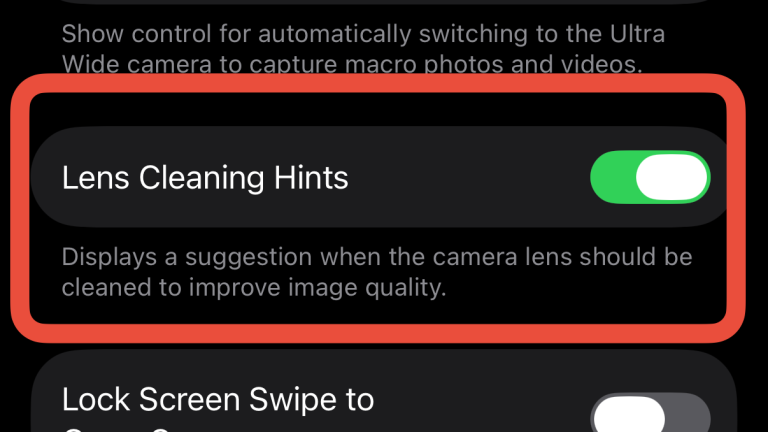
    The Lens Cleaning Hints setting.
    Apple/Screenshot by CNET

    Once enabled, your iPhone will detect if its front camera lens is dirty and your device will tell you to clean it to improve your image quality. It’s a nice way to make sure you always get a good picture and it could be helpful if you let your kids play with your phone, leaving smudges all over it. 

    For more on iOS, here’s what to know about iOS 27 and everything to know about iOS 26

    Apple’s New Lease Program, NY Sues Kalshi and the Latest on Australian’s Social Media Ban | Tech Today

    Enable feature iPhone This your
    Share. Facebook Twitter Pinterest LinkedIn WhatsApp Reddit Email
    Previous ArticleFestival top spot for film honouring talented little sister
    Next Article Hollywood stars in North East to film farming thriller

    Related Posts

    Qatar Photography Center Director to QNA: Photography highlights Qatar’s sporting Renaissance locally and Internationally

    August 21, 2026

    This ‘Impossible’ to Make Phone Heralds a New Era for Mobile Filmmaking

    August 21, 2026

    Your front-row seat to the Sundance Film Festival starts at CU Boulder

    August 21, 2026

    UMC and Magazine win top honors for shining a light on Wake Forest

    August 20, 2026

    Middlesbrough photography project capture town’s pride

    August 20, 2026

    Fujifilm asks photographers to vote on its next three ‘dream lenses’

    August 19, 2026
    Add A Comment
    Leave A Reply Cancel Reply

    Editors Picks

    Guild Wars 2 Art Shows Upcoming Projects

    January 12, 2021

    Scary Movie 6: Release Date, Plot, Cast & Preview

    January 12, 2021

    Where is Pearl in the Mist Filmed?

    January 12, 2021

    How Conspiracy Inspired ‘Scary of Sixty-First’

    January 12, 2021
    Top Reviews
    Sound & Music

    Adobe Firefly becomes audio studio for AI-generated music, voices and sound effects

    By
    Editing & Post Production

    Google Slides gets a new trick for turning presentations into videos

    By
    Screenwriting

    Danny Boyle on Trainspotting

    By
    • Facebook
    • Twitter
    • Pinterest
    • Instagram
    • YouTube
    • Vimeo

    Subscribe to Updates

    Get the latest creative news from SmartMag about art & design.

    About Us
    About Us

    CinemaMix360 is your trusted destination for the latest movie news, TV updates, official trailers, and filmmaking resources. We bring together entertainment industry coverage and educational content to inspire film lovers, creators, and aspiring filmmakers around the world.

    Our Picks

    Watching Wonder Woman 1984 with an HBO Max Free Trial?

    January 13, 2021

    Wonder Woman Vs. Supergirl: Who Would Win

    January 13, 2021

    PS Offering 10 More Games for Free, Including Horizon Zero

    January 13, 2021

    Subscribe to Updates

    Stay tuned for more movie news, TV updates, trailers, and filmmaking insights.

    Facebook X (Twitter) Instagram Pinterest
    • About Us
    • Get In Touch
    • Disclaimer
    • Privacy Policy
    • Terms & Conditions
    © 2026 CinemaMix360. All Rights Reserved.

    Type above and press Enter to search. Press Esc to cancel.