

Close Menu
CinemaMix360

    Subscribe to Updates

    Get the latest creative news from FooBar about art, design and business.

    What's Hot

    Nothing’s New Earbuds Can Save Snippets of Sound

    August 14, 2026

    BeautyPlus Launches AI Influencer Generator for Consistent Virtual Content Creation

    August 14, 2026

    DINOSAURS ARE SINGING BY TIM GNAZALE WINS $10,000 GRAND PRIZE IN CUT TO BLACK PRIZE

    August 14, 2026
    Facebook X (Twitter) Instagram
    CinemaMix360
    Facebook X (Twitter)
    • Home
    • Movies
    • TV
    • Film School
    • Festivals
    • Indie
    • Trailers
    • Videos
    • Careers
    • AI & Tech
    • More
      • Cinematography
      • Directing & Producing
      • Editing & Post Production
      • Screenwriting
      • Sound & Music
    CinemaMix360
    Home»Editing & Post Production»5 new video editing tools in Google Photos
    Editing & Post Production

    5 new video editing tools in Google Photos

    By August 14, 2026No Comments3 Mins Read
    Facebook Twitter Pinterest LinkedIn Reddit WhatsApp Email
    5 new video editing tools in Google Photos
    Share
    Facebook Twitter Pinterest Reddit WhatsApp Email

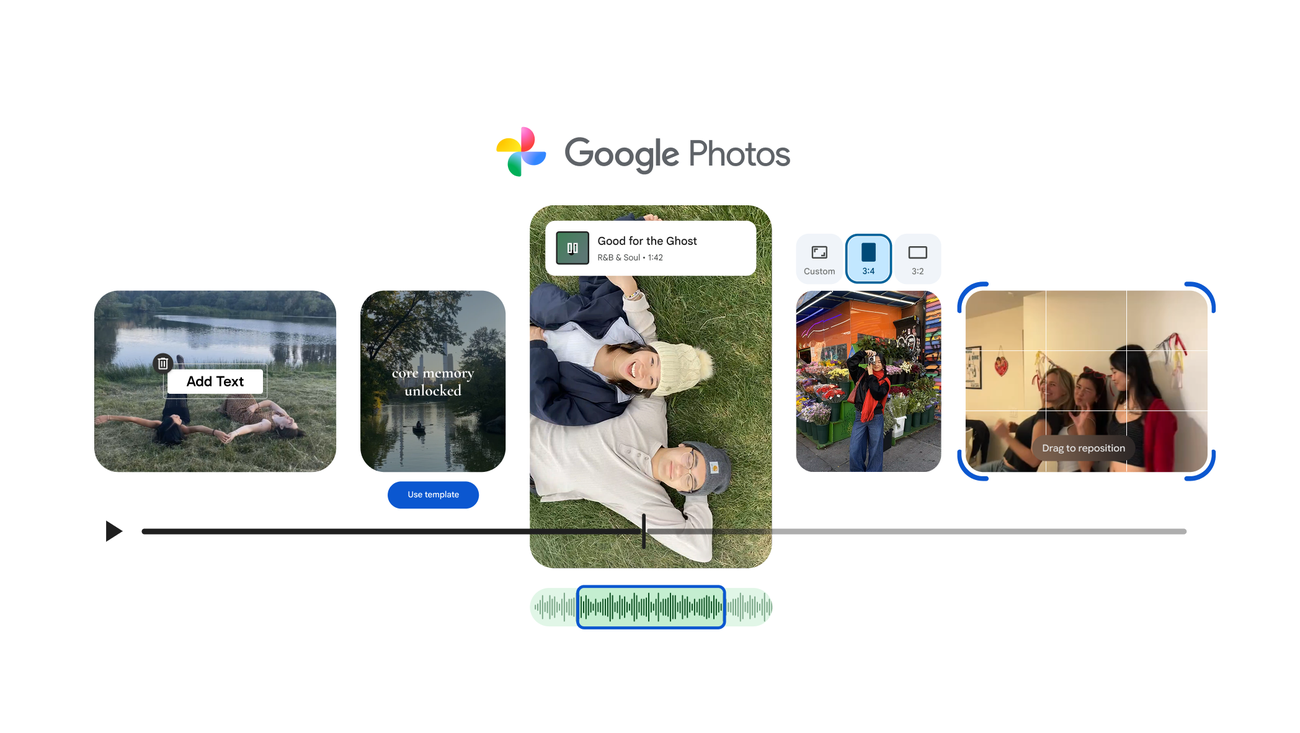
    Use ready-made templates or add music and custom text to your videos in the new video editor.

    Group Product Manager, Google Photos

    Creating a highlight reel featuring multiple video clips and photos in Google Photos is simple: Just head to the Create tab and select “highlight video,” pick the content you want included and Photos will create a single cohesive video for you.

    And now, creating and editing your videos is easier than ever with new features you’ve been asking for. From using ready-made templates and the redesigned video editor to adding music and custom text, here are five features you can use to create personalized videos right in Google Photos:

    1. Create shareable highlight videos quickly with templates

    Don’t know where to begin? Rolling out on Android, templates give you pre-set formats with built-in music, text and cuts synced to a soundtrack. Just pick a template, select the photos and videos you want included and sit back while Photos automatically creates a shareable video that matches the beat. Head to the Create tab and select “highlight video” to get started — and stay tuned for new templates.

    2. Try the easy-to-use redesigned video editor

    The new video editor on Android and iOS is faster and easier to use, so you can fine-tune your highlight videos and get creative right away. It features a universal timeline that supports multi-clip editing and storytelling, along with an adaptive canvas for easier editing. Everything you need is right where you expect it to be, so you can spend less time figuring out how to edit and more time creating.

    3. Add the perfect soundtrack

    A great video is even better with great music. Now you can easily browse Photos’ music library and pick the perfect soundtrack to add some emotion or bring out the right vibe to your highlight video on Android and iOS.

    4. Tell your story with custom text

    Add context or a creative touch with stylish text overlays to your highlight videos on Android. You can add and customize text with new fonts, colors and backgrounds so your message stands out.

    5. Edit and customize individual video clips

    The redesigned editor is also now the default video editor on Android for quick and easy edits to individual video clips. Just open a video from your gallery and tap edit to get started. And with the new editor you can now add music and text to a single video clip for an even more custom look.

    All of these updates are either already available or rolling out now, giving you everything you need to create amazing videos all within Google Photos.

    editing Google Photos Tools video
    Share. Facebook Twitter Pinterest LinkedIn WhatsApp Reddit Email
    Previous ArticleStephen Colbert and His Son Are Writing That Tom Bombadil Movie We Never Exactly Asked For
    Next Article Introducing Syrup Sound: A Sound Design Studio for Shows That Take Audio Seriously

    Related Posts

    BeautyPlus Launches AI Influencer Generator for Consistent Virtual Content Creation

    August 14, 2026

    How to Extend an AI-Generated Video Clip Past Its Length Limit (Without the Drift)

    August 14, 2026

    Don Carlos Marbella Hotel Hands Legacy Back to Guests

    August 13, 2026

    Monet Grading System– a DaVinci Resolve workflow project from Japan

    August 13, 2026

    Photos: Intern Kevin goes undercover

    August 13, 2026

    These 5 Samsung Gallery features are so good you’ll want to ditch Google Photos

    August 12, 2026
    Add A Comment
    Leave A Reply Cancel Reply

    Editors Picks

    Guild Wars 2 Art Shows Upcoming Projects

    January 12, 2021

    Scary Movie 6: Release Date, Plot, Cast & Preview

    January 12, 2021

    Where is Pearl in the Mist Filmed?

    January 12, 2021

    How Conspiracy Inspired ‘Scary of Sixty-First’

    January 12, 2021
    Top Reviews
    Sound & Music

    Nothing’s New Earbuds Can Save Snippets of Sound

    By
    Editing & Post Production

    BeautyPlus Launches AI Influencer Generator for Consistent Virtual Content Creation

    By

    DINOSAURS ARE SINGING BY TIM GNAZALE WINS $10,000 GRAND PRIZE IN CUT TO BLACK PRIZE

    By
    • Facebook
    • Twitter
    • Pinterest
    • Instagram
    • YouTube
    • Vimeo

    Subscribe to Updates

    Get the latest creative news from SmartMag about art & design.

    About Us
    About Us

    CinemaMix360 is your trusted destination for the latest movie news, TV updates, official trailers, and filmmaking resources. We bring together entertainment industry coverage and educational content to inspire film lovers, creators, and aspiring filmmakers around the world.

    Our Picks

    Watching Wonder Woman 1984 with an HBO Max Free Trial?

    January 13, 2021

    Wonder Woman Vs. Supergirl: Who Would Win

    January 13, 2021

    PS Offering 10 More Games for Free, Including Horizon Zero

    January 13, 2021

    Subscribe to Updates

    Stay tuned for more movie news, TV updates, trailers, and filmmaking insights.

    Facebook X (Twitter) Instagram Pinterest
    • About Us
    • Get In Touch
    • Disclaimer
    • Privacy Policy
    • Terms & Conditions
    © 2026 CinemaMix360. All Rights Reserved.

    Type above and press Enter to search. Press Esc to cancel.