

Close Menu
CinemaMix360

    Subscribe to Updates

    Get the latest creative news from FooBar about art, design and business.

    What's Hot

    Disco Arabesquo to Host Exhibition for Egyptian Cinema at ADE ’26

    October 12, 2026

    Can AI Make Video Editing Faster Without Making It Look Artificial?

    October 12, 2026

    James Gunn is already writing his next film in the DC Universe

    October 12, 2026
    Facebook X (Twitter) Instagram
    CinemaMix360
    Facebook X (Twitter)
    • Home
    • Movies
    • TV
    • Film School
    • Festivals
    • Indie
    • Trailers
    • Videos
    • Careers
    • AI & Tech
    • More
      • Cinematography
      • Directing & Producing
      • Editing & Post Production
      • Screenwriting
      • Sound & Music
    CinemaMix360
    Home»Editing & Post Production»Adobe Photoshop Adds a Whole New AI Editing Mode
    Editing & Post Production

    Adobe Photoshop Adds a Whole New AI Editing Mode

    By August 28, 2026No Comments3 Mins Read
    Facebook Twitter Pinterest LinkedIn Reddit WhatsApp Email
    Adobe Photoshop Adds a Whole New AI Editing Mode
    Share
    Facebook Twitter Pinterest Reddit WhatsApp Email

    Adobe has been increasing Photoshop’s AI capabilities over the past year.

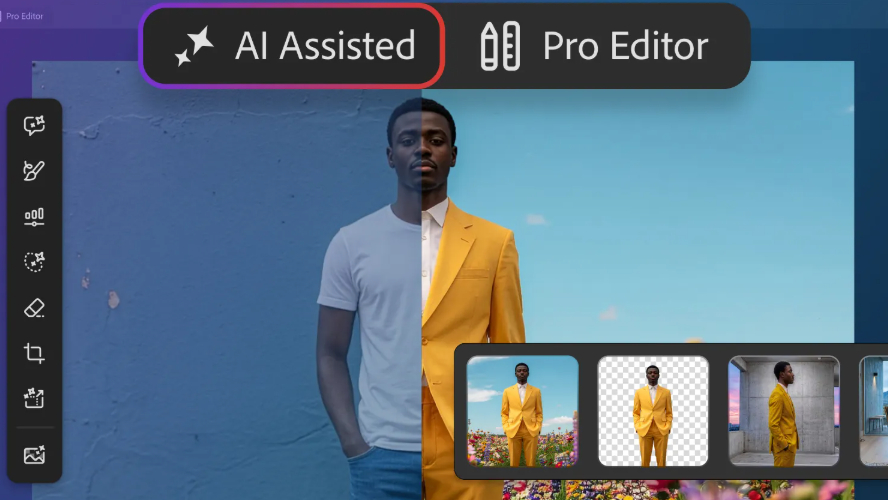
    Adobe is giving Photoshop users more AI tools for their work belt. A new feature called AI Assisted Editor lets you do a variety of things with your images using merely natural language prompts. It’s not replacing the traditional Pro Editor; it’s just another option.

    Adobe also announced several other new features on Thursday — a light adjustment layer for more lighting controls, Instruct Edit with Masks for prompt-based editing, and Markup to let you visually communicate edits by drawing on an image.

    Adobe has been busy with new AI wrinkles in the past several months. AI Assistant arrived in March to enable editing with conversational commands, and in June, the company added AI assistants to Photoshop, Premiere Pro, InDesign, Illustrator and Frame.io. Earlier this month, OpenAI and Adobe teamed up to integrate dozens of photo- and video-editing capabilities into ChatGPT.

    AI Assisted Editor is currently being tested in the beta version of Photoshop, which costs $23 per month.

    AI Assisted Editor keeps it simple

    When you open Photoshop, you will see two editing interface options: AI Assisted and Pro Editor. AI Assisted is the new feature announced Thursday, and Pro Editor is Photoshop’s classic workspace offering manual control over layers, adjustments and editing tools.

    Photoshop masters are likely comfortable with Pro Editor, but less-experienced users might gravitate toward AI Assisted for simpler editing.

    If you go with AI Assisted, you can use a natural language prompt bar to request edits and changes. A vertical tool bar includes seven functions, including prompt to edit (using natural language prompts), remove background, generative expand (extend image dimensions), generative remove (eliminate unwanted objects), generative fill (add, replace, or remove content), generative upscale (increase image resolution) and AI markup (annotate images).

    The Prompt to Edit function could be the biggest game changer. You can change out the image entirely with a natural language prompt. Maybe you’ve got an image of someone sitting on a beach, but want them in the mountains. A prompt of “Put this person on a hiking trail in the mountains” could do the trick.

    More new Photoshop features

    Adobe also announced three other new options for what the company called “more precise, sharper editing.” The light adjustment layer lets you toggle through several lighting controls — exposure, contrast, highlights, shadows, whites and blacks.
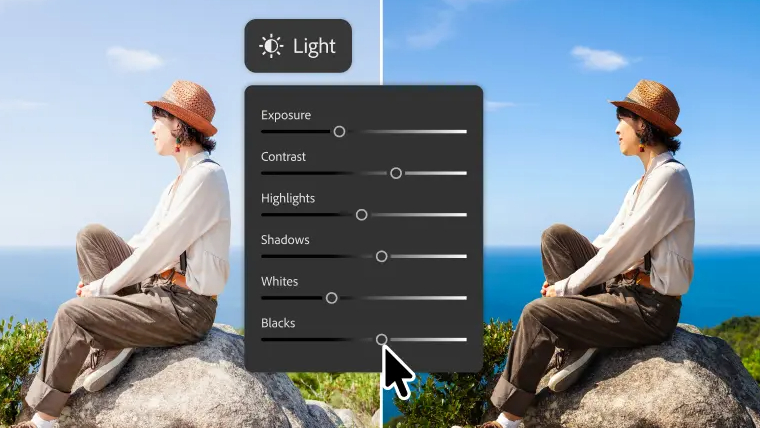
    Photoshop Light Adjustment Layer feature
    Photoshop’s Light Adjustment Layer lets you toggle between several adjustments.

    With the Instruct Edit with Masks function, you can simply describe the edits you want in the masked areas — have the person smile, put the bird in flight, open the blue door — instead of having to mark every area on the image that you want to edit.

    With the markuptool, you can draw on an image to tell the AI your changes. You might circle a building and tell the AI to make it brown, or maybe draw an arrow to where you want a certain object. Adobe says markup is a way of being more precise with the AI to avoid any ambiguity that might occur if you instead used text prompts.

    Adds Adobe editing Photoshop Whole
    Share. Facebook Twitter Pinterest LinkedIn WhatsApp Reddit Email
    Previous Article‘No Idea In My Writing, It Can Get Crazy’: Internet Revisits Geetu Mohandas’ Old Video After Toxic Gets Mixed Response
    Next Article Dolly Parton, country music icon,dies at 80, after a remarkable career spanning music, film and philanthropy

    Related Posts

    Can AI Make Video Editing Faster Without Making It Look Artificial?

    October 12, 2026

    Best Photoshop alternatives – no

    October 12, 2026

    Fun Official Fan Edit Trailer for ‘THG: Sunrise on the Reaping’ Movie

    October 11, 2026

    Still Editing Photos On A Monitor? Here Are 5 Tablets To Consider Instead

    October 11, 2026

    How Long Can Meta Glasses Record?

    October 10, 2026

    We’re hiring: Social Media Video Editor

    October 10, 2026
    Add A Comment
    Leave A Reply Cancel Reply

    Editors Picks

    Guild Wars 2 Art Shows Upcoming Projects

    January 12, 2021

    Scary Movie 6: Release Date, Plot, Cast & Preview

    January 12, 2021

    Where is Pearl in the Mist Filmed?

    January 12, 2021

    How Conspiracy Inspired ‘Scary of Sixty-First’

    January 12, 2021
    Top Reviews

    Disco Arabesquo to Host Exhibition for Egyptian Cinema at ADE ’26

    By

    Can AI Make Video Editing Faster Without Making It Look Artificial?

    By

    James Gunn is already writing his next film in the DC Universe

    By
    • Facebook
    • Twitter
    • Pinterest
    • Instagram
    • YouTube
    • Vimeo

    Subscribe to Updates

    Get the latest creative news from SmartMag about art & design.

    About Us
    About Us

    CinemaMix360 is your trusted destination for the latest movie news, TV updates, official trailers, and filmmaking resources. We bring together entertainment industry coverage and educational content to inspire film lovers, creators, and aspiring filmmakers around the world.

    Our Picks

    10 Best Vlogging Cameras in 2026: Top Picks for Creators

    September 28, 2026

    AI Tools for Film Production: 15 Best Picks

    September 9, 2026

    Young Cinema-Goer Picks Up the Tab for Mum in National Cinema Weekend Campaign

    September 1, 2026

    Subscribe to Updates

    Stay tuned for more movie news, TV updates, trailers, and filmmaking insights.

    Facebook X (Twitter) Instagram Pinterest
    • About Us
    • Get In Touch
    • Disclaimer
    • Privacy Policy
    • Terms & Conditions
    © 2026 CinemaMix360. All Rights Reserved.

    Type above and press Enter to search. Press Esc to cancel.