


I spend way too much time using AI image tools. Most of these are available online and through specific apps, but recently, many of these AI tools have been popping up on our phones. So I decided to pit Apple’s iPhone and Google’s Pixel against each other to see which has the better built-in AI tools for photo editing.
We’re rapidly approaching Google’s Pixel 11 event and Apple’s anticipated fall iPhone event. Made by Google is slated for Aug. 12, and we’re expecting to see Google’s hardware prowess on display, meshed with Android software. Undoubtedly, AI will play a big role in both events.
I brought my Pixel 10 Pro XL and iPhone 16 to three different events where you want to take photos but might struggle to get a clear shot: the beach, concerts and family vacations. To keep things fair, I took photos on both phones and used each device’s AI to edit the photos from each camera. I wasn’t just comparing the cameras, but the editing software available for pictures of any resolution and quality. I didn’t specifically test any Samsung Galaxy phones, but Samsung and Google share a lot of similar software, including some AI capabilities.
Like many people who use these built-in AI image editing tools, I wanted to see if the AI could make small, concrete edits – no AI slop here. The goal was to make my pictures good enough so I wouldn’t have to export them to another app. I tried to remove photobombers and clean up my human-generated photography mistakes. But to get a full sense of how AI image tech works on iPhones and Pixels, I experimented with every available tool.
Photo editing has been one of the biggest selling points for creative AI – – – a “practical” use for AI that everyone can appreciate, enthusiasts argue. There’s certainly a benefit to having photo-editing tools built into your phone, and AI can make them easier to use. But creative AI is controversial. As we use more generative AI image tools, the line between real and fake images blurs, if it still exists at all.
But if you just need those quick fixes, there is undeniably a clear winner between Apple and Google.
AI photo editing on the iPhone and Pixel
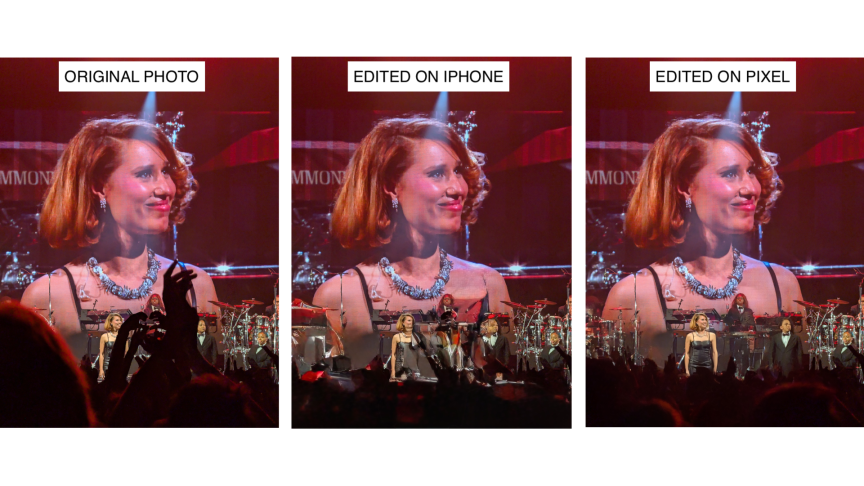
Generative remove is one of the most popular AI photo editing tools, for good reason. Both Google and Apple offer AI-powered ways to remove errant objects and photobombers. I gave both a chance to edit one of my favorite photos I captured at a Raye concert.
There’s nothing wrong with my original shot — the heart-hands and clapping arguably add a nice human touch and a dramatic flair that I think Raye would appreciate. But if you really want a clear shot and are, er, vertically challenged like me, AI can step in. Neither is perfect, but the Pixel handled the edit well enough that I could post to Instagram. The iPhone didn’t seamlessly fill the hole it made after removing the hands, leading to a visible distortion.
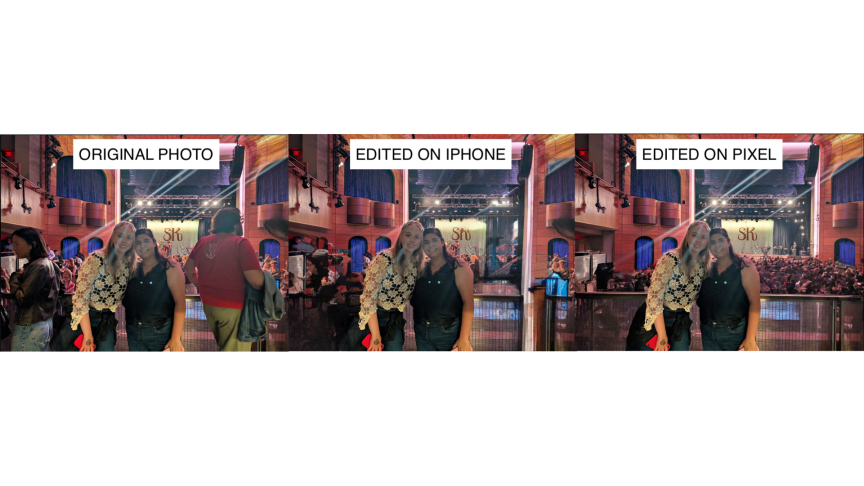
I gave Apple another chance with a different concert pic, this time a picture a nice stranger took of my friend and me. Apple handled this one a bit better. Every AI removal tool does better when the objects it’s trying to remove are clearly defined, but Google’s AI handled the ambiguity better than Apple’s did.
One of the hardest tests I give AI image tools is asking them to remove reflections, like in the windows of this souvenir shop on a sunny day. It’s a notoriously tough task for (human) photo editors, and it’s the kind of tedious work that generative AI, at its best, should be able to help with. Nothing has lived up to the task, including my iPhone, until I tried it on the Pixel.

The Pixel AI-edited image is so good that my initial assumption was that Gemini had simply cropped the reflection out. But it didn’t; the sunlight from behind me is muted, the room on the other side of the window is darkened. The windows are clear, showcasing the beautiful, hand-carved wooden ducks in the window display. It was the first time in a while I’ve been stunned (in a good way) by AI.
While camera quality is one of the most important considerations when picking a new smartphone, it doesn’t necessarily play into how well the AI editing tools work. Certainly, a better camera that captures higher-resolution photos gives the AI more data to work with, which improves your odds of a better outcome. But Apple simply doesn’t have as many AI editing tools as Google does, which means that you could be using the nicest iPhone camera (the iPhone 17 Pro Max, in CNET’s opinion) and you still may not be able to get the AI to do what you want.
For example, I knew my 2-year-old iPhone 16 didn’t have as nice a camera as the Pixel 10 Pro XL. But even when I exported my iPhone-captured image to the Pixel, Google’s phone handled edits better than the phone that originally took the picture.

The Pixel’s AI Enhance brought out the detailed texture in algae surrounding the log and made it more noticeable by artificially darkening the water. I liked the saturated final look, but not everyone may agree. But I couldn’t do any kind of AI enhancement on my iPhone. Apple doesn’t offer a comparable AI feature; Clean Up is the sole AI photo editing tool.
This is a nice feature if you want it, but I don’t know how many people truly need this editing flow. I see it a lot in AI image generators, which makes sense when you’re creating an entirely new image. You can also animate your photos and turn them into AI videos, which, again, I don’t think anyone really needs. But it’s there if you do.
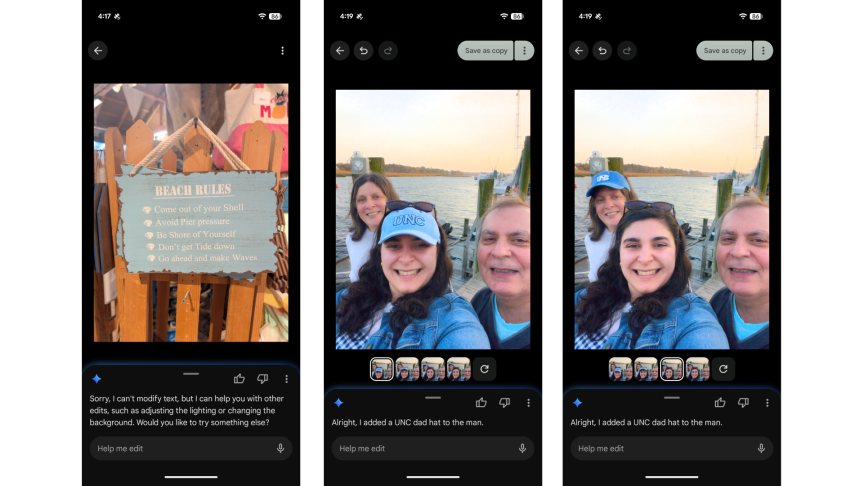
Google also lets you edit photos with text AI prompts. But like every AI tool, it doesn’t always work. Check out this selfie of my parents where, after I asked the AI to put a UNC hat on the man, it proceeded to put it on my mom and me. The Pixel also couldn’t or wouldn’t edit the text inside images.
Google wins without question
It pains me to say it as an Apple loyalist, but Apple’s AI image editing tools don’t hold a candle to Google’s.
My Pixel offered a much more robust suite of AI editing options that could do way more than my iPhone could. The Pixel’s generative removals were better and fit more seamlessly compared to my iPhone. While both made mistakes, my Pixel did it far less often than my iPhone, which made it feel like I hit a snag every time I wanted to make more than one change.
And this makes a lot of sense when you think about how different Apple’s and Google’s AI journeys have been. Google had decades of deep machine learning research that made it well prepared for the eventual generative AI age. It has built some of the best AI models on the market for any task. Google’s Nano Banana redefined the creative AI industry, and it was the first big tech company to introduce synchronized audio in AI videos.
In short, Google has been a stronger player for longer in the AI game. But it’s Apple’s intentional slow-play with AI that might prove to serve the company in the long run, as every other tech company devotes the bulk of its re
It’s too soon to tell, but if we’re judging solely on AI photo tools, Google is undeniably the winner – at least for now.
