


Kino AI video editing tool streamlines post-production with searchable footage, agent-assisted edits, and collaborative timeline reviews
Ai Tools · 9 Nov 2026 · 2 min read
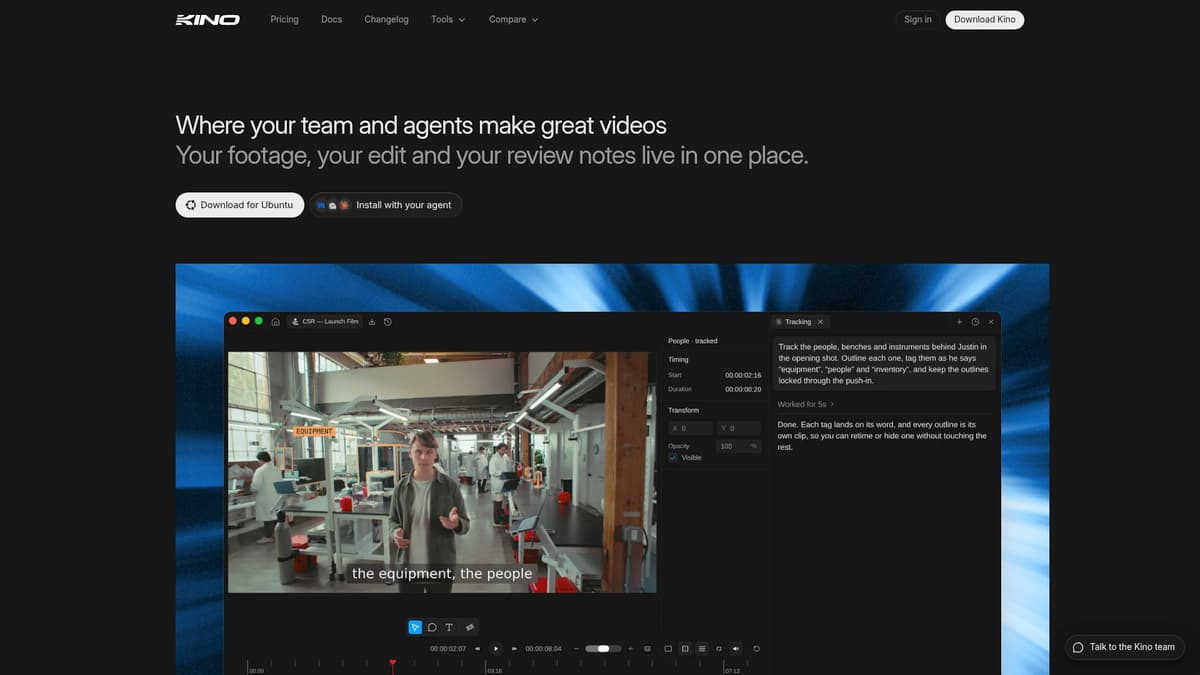
Kino is a desktop-first AI-powered video editing tool designed to help teams, producers, and creative professionals manage and edit video content more efficiently. It combines advanced metadata generation, AI-driven editing agents, searchable archives, and cloud-based proxy workflows to streamline post-production and review processes.
Key Features
-
Metadata & Searchable Footage: Kino automatically transcribes, describes, and indexes each clip so users can search by what’s said, what’s shown, who’s onscreen, even by codec or shoot day. This feature helps you locate specific moments in hours of footage with simple natural-language queries.
-
Built-in AI Agent: Provides capabilities like rough-cut assembly, best-take selection, vertical or format-based versions, motion graphics, and template-driven edits. You can run the Kino agent itself, or connect agents like Claude Code or Codexiptions
-
Native Timeline Editor & Collaboration: Full-featured editor on Mac, Windows, and Linux that lets team members review and comment directly on timelines. Proxy storage enables streaming low-resolution previews for review without needing full local file access. Review links work without requiring reviewers to have accounts, and feedback syncs back into the editing timeline.
-
Rich Format Support & Export Options: Handles camera-original footage formats like RED, Blackmagic RAW, ProRes, DNxHR, and MXF. Offers flexible format outputs, LUTs, custom fonts, vertical/portrait output, motion graphics, accelerators like video stabilization, audio cleanup, and exporting to DaVinci Resolve, Premiere Pro, or After Effects (beta).
-
Asset Library & Brand Tools: Features like reusable characters, props, scenery; brand kits including custom fonts and LUTs; extensive template library; multi-format delivery (e.g. landscape, square, vertical) from a single edit.
Pricing
Kino offers a free tier and a paid Pro plan. The Free plan provides access to the full editor, unlimited imports and exports, and essential features like real-time collaboration, with a monthly allotment of AI indexing hours and cloud proxy storage. The Pro plan is priced at approximately $25 per editor per month ($240 annually, equivalent to $20/month billed yearly) and includes significantly more indexing hours, larger cloud storage allocations, review links, enhanced AI agent usage and overage provisions for indexing and storage beyond plan limits. Enterprise-tier options are available with custom pricing for higher volume and team-level needs.
Who is it for?
Kino is best suited for small to mid-size video teams, creative agencies, marketing departments, and content producers seeking to reduce manual labor in post-production. It excels in environments with large amounts of footage—interviews, events, vlogs—where searching, organizing, and quickly selecting best takes saves time. For agencies needing to produce variants (vertical social cuts, multi-language versions, etc.) or to manage client feedback loop with external reviewers, Kino’s review links and format tools are very useful. It is also beneficial for professionals who want to combine AI agents with human oversight, especially with compatibility with tools like Claude and ChatGPT, and for teams that require flexible cross-platform workflows (Mac, Windows, Linux) and camera-native format support.
Final thoughts
Kino stands out as a powerful tool for streamlining workflows in video post-production, especially in scenarios where footage volume, multiple formats, and feedback loops are bottlenecks. Its metadata-driven search, agent-assisted editing, and strong collaboration features offer clear advantages for teams seeking efficiency. However, purely high-end color grading, or effects-heavy finishing work may still rely on specialized tools. For those whose needs align with its strengths—quick assembly, variant delivery, format-aware editing—Kino provides compelling value.
Visit the official website for more.
Keep up to date with our stories on LinkedIn, Twitter, Facebook and <a href="https://www.instagram.com/dynamicbusinessau/” rel=”nofollow noopener” target=”_blank”>Instagram.
Tags
#video editing#media management#collaboration
From the floor
Closer to this story than we are?
If you’re building in this space — or watching it reshape your market — pitch us. We edit it; you get the byline.
