


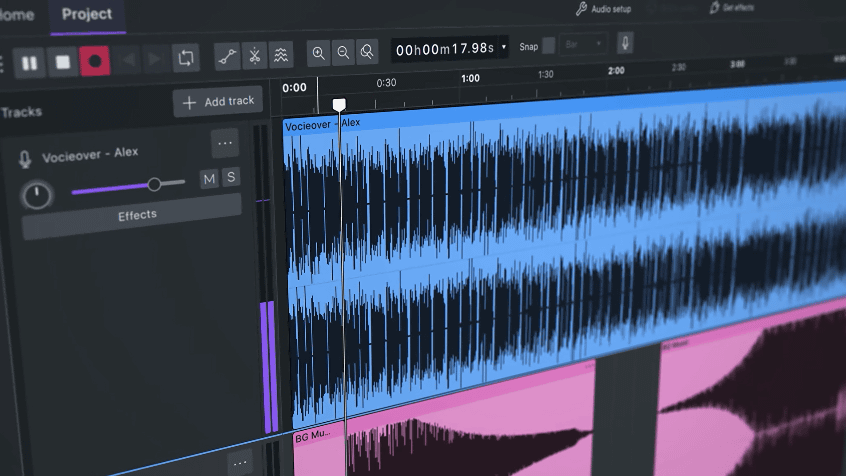
Audacity , a free, open-including Linux, macOS, and Windows, has <a href="https://cinemamix360.com/2026/09/05/minitool-released-moviemaker-8-9-with-advanced-keyframe-animation/” title=”MiniTool Released MovieMaker 8.9 with Advanced Keyframe Animation”>released a major update, version 4.0.0 (Audacity 4). Audacity 4 features a redesigned application interface using Qt and introduces many user-friendly features, including a new clip editing model
Release Audacity-4.0.0 · audacity/audacity · GitHub
https://github.com/audacity/audacity/releases/tag/Audacity-4.0.0
Introducing Audacity 4: New tools & a new look – YouTube
The changes in Audacity 4 are as follows:
◆Refreshed clip editing function
Audacity 4 features significant changes to how clips, the fundamental unit of audio editing, are handled. Clips can now be selected directly by clicking their headers or by holding down the Shift key and clicking to select multiple clips. Move, trim, and time stretch functions are applied to all selected clips. A feature to group multiple clips has also been added.
Each clip can now be positioned more freely, moving between mono and stereo tracks, and when you move a clip on top of another, the overlapping portion is replaced. The clip paste function can now handle more cases automatically, creating tracks as needed, adjusting compatible channel layouts, and pasting audio files from the operating system’s clipboard.
A dedicated splitting tool has also been added; you can split by pressing or holding down the S key and clicking on the waveform or clip header. Additionally, operations such as ‘Split,’ ‘Split Cut,’ ‘Split Delete,’ ‘Split at Silent Section,’ and ‘Split to New Track’ are available as commands.
◆ Interface and Tools
Audacity 4 features a redesigned interface based on Qt, supporting native high-DPI rendering. Toolbars and panels can now be moved, docked, floated, shown, and hidden, and UI layouts can be saved as ‘workspaces.’ Three pre-existing workspaces are available: ‘Modern,’ ‘Classic,’ and ‘Music.’
In addition to light, dark, and high-contrast themes, accent colors, track colors, and multiple clip styles are also available. Furthermore, the new home screen now displays recently worked-on projects with preview thumbnails.
Furthermore, the four previous modes—’Select,’ ‘Envelope,’ ‘Draw,’ and ‘Multi-tool’—have been abolished, and the operation method now switches depending on the function. The Sync-Lock function has also been abolished, and an explicit option has been added that allows you to choose whether to leave a blank space to maintain timing or move subsequent material when performing delete, cut, and paste operations.
◆Playback and recording
The playback head remains visible even while you’re moving the screen, and you can drag it to move to a new position. It’s also now possible to seek to a different position without stopping playback.
Recording can be started anywhere on the timeline, and a new clip is created at that point. Other features, such as punch-and-roll, lead-in recording, latency compensation, software thruplay, and per-track input monitoring, have been redesigned to suit the new interface. The official Windows version also supports ASIO playback and recording.
◆ Track Meter Effects
Real-time playback and recording meters are now displayed in the track header. Presets are now handled consistently as built-in effects, destruction effects, and real-time effects.
Additionally, the built-in effects, generators, and analyzers have been redesigned for the Qt interface. If the plugin interface is unavailable, Audacity can display the generated controls. Furthermore, the spectrogram has been redesigned with clearer guidance and memory, and rendering speed has also been improved.
◆Project Import & Export
Audacity 4 uses a new project format called ‘.aup4,’ which also changes the project saving format. Projects in the ‘.aup3’ format used in Audacity 3 can be opened in Audacity 4 and converted to ‘.aup4’ without modifying the original file. However, the converted project cannot be saved back in the original ‘.aup3’ format. It is also possible to import even older ‘.aup’ format projects.
The new ‘.aup4’ project file also saves preview thumbnails and data about clips and appearance added in Audacity 4.
◆Compatibility with Audacity 3
Features from Audacity 3, such as ‘Time Track,’ ‘Note/MIDI Track,’ ‘Mixer,’ ‘Macro Manager and Script Pipe,’ ‘VAMP and LADSPA Plugin Hosting,’ and ‘Speed Playback,’ are not yet implemented in Audacity 4 and are ‘planned to be added in future releases.’ In addition, some features such as export, rendering, analyzer, and effects are also not yet implemented.
In addition, the Audacity logo has also been revamped along with the Audacity 4 update. Martin Keighley, Vice President of Product at Muse, the company that develops Audacity, pointed out that while Audacity 4 refreshed not only its functionality but also its brand image, the Audacity logo, which had not undergone any major changes, ‘is iconic, but most people would probably consider it outdated.’
The announcement that the logo for the free audio editing app ‘Audacity’ will be revamped has sparked numerous expressions of disappointment – GIGAZINE
The actual Audacity 4 announcement logo looked something like this.
Audacity 4 can be downloaded from GitHub.
Release Audacity-4.0.0 · audacity/audacity · GitHub
https://github.com/audacity/audacity/releases/tag/Audacity-4.0.0
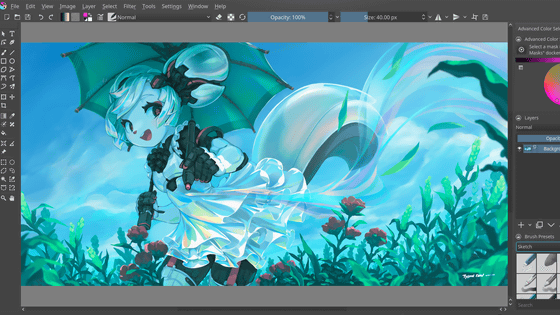
Krita, a painting software for artists to create works from start to finish, officially releases version 5.0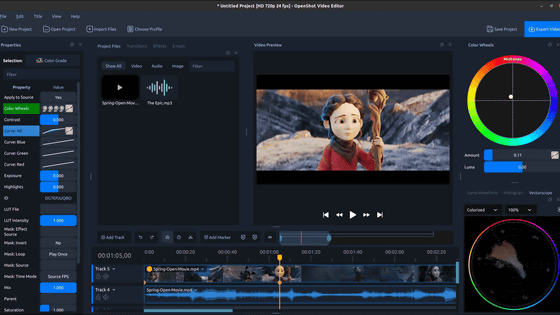
OpenShot Video Editor, an open-source video editing software, has released ‘OpenShot 4.0,’ which represents the biggest creative workflow upgrade to date.
Free software “Suzuka” to make Flash on a timeline basis
‘Thunderbird 128 Nebula’ released, including improved notification function and multiple folder selection function
Safari 16.4 Released, Adds 135 New Web Features and Over 280 Updates to WebKit
“XtraFinder” which enables you to display multiple windows in one by adding tabs to Mac’s Finder
Firefox 145 official release, adding comments to PDF documents
‘YouTube Video and Audio Downloader’, an extension for Firefox that allows you to download video and audio files from YouTube for free
Sep 04, 2026 20:00:00
in AI, Software, Posted by log1e_dh
