


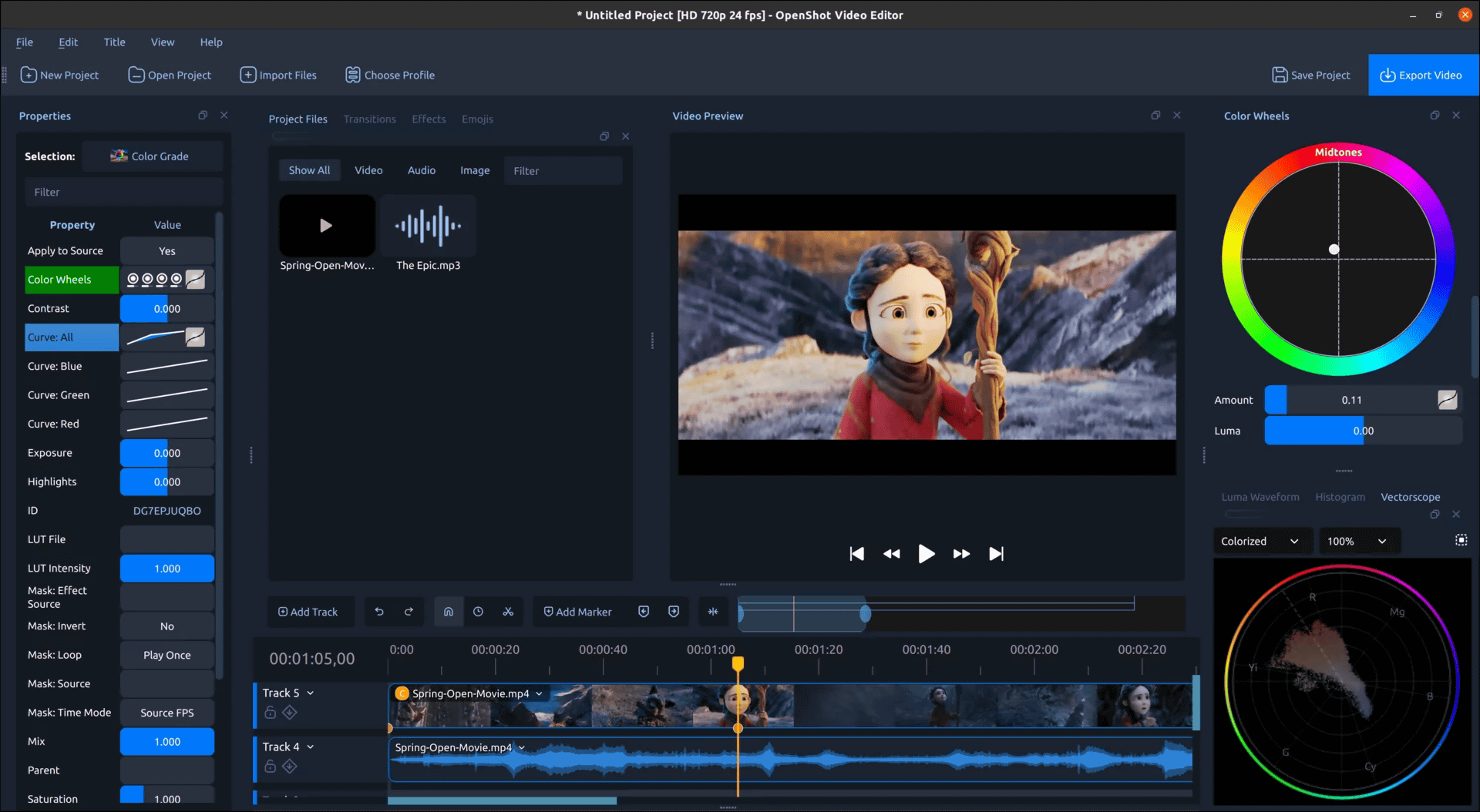
OpenShot Video Editor, an open-epresents the biggest creative workflow upgrade to date
OpenShot Video Editor, an open-source video editing software, has released OpenShot 4.0 , which brings the largest creative workflow upgrade to date. It now allows direct recording of screen, webcam, microphone, and system audio into projects, and enables color correction and grading of footage using color wheels, curves, lookup tables (LUTs), and video scopes. It also makes it easy to isolate subjects using locally running machine learning models and create animated audio visualizations.
OpenShot Video Editor | OpenShot 4.0: Record, Edit, and Color Like Never Before
https://www.openshot.org/blog/2026/08/30/openshot-40-record-edit-color-like-never-before/
◆ColorView
OpenShot 4.0 introduces a new ‘Color View’ feature that allows for image correction and color grading using high-precision functions such as a color wheel, curves, LUTs, and live video scope, in addition to easy-to-use presets.
All color grading effects are keyframeable, allowing you to change everything over time, including the color wheel, curves, correction controls, LUT intensity, and overall mix. This makes it possible to compensate for changing lighting during shooting or animate stylish color changes.
The way an image appears on a monitor is affected by various factors, including the monitor’s color settings and room lighting. Therefore, OpenShot 4.0’s videoscope displays detailed information about the actual color and brightness within the video frame. It also includes a luminance waveform, histogram, RGB parade, and vectorscope, allowing you to check exposure, detect highlight clipping, compare color channels, judge saturation, and maintain the naturalness of skin tones.
◆Recorded View
The recording view has been redesigned, allowing you to record sources such as microphone, desktop, and webcam simultaneously without having to set up a separate import workflow. Each enabled source is recorded as a separate media file and timeline clip. Microphone audio is separated from system audio, and webcam audio is also separated from screen capture. After recording, you can trim mistakes, adjust audio volume, trim camera footage, move picture-in-picture windows, and apply effects to specific sources without affecting other sources.
The recording view provides real-time feedback before and during a session. You can check the microphone meter, preview the webcam, and view temporary clips displayed on the timeline during recording.
◆10 new effects
Ten new effects have been added.
• Audio Visualization: Converts sound into animated visuals.
• Beat Sync: Converts the energy of an audio clip into a color layer that reacts to beats and loud sounds.
• Film Grain: Converts to reproducible animated grains that allow you to adjust size, softness, cohesiveness, tone response, color changes, variations, and consistency.
• Denoise Image: Reduces brightness noise and color unevenness without compromising motion or detail.
• Shadow: Creates a soft drop shadow with adjustable color, distance, angle, blur, spread, and opacity.
• Glow: Adds an outer or inner halo (light ring) around the indicated pixel.
• Displacement Map: Use an image or video to transform another clip.
• Timer: Generates customizable count-up or count-down displays for tutorials, challenges, sports, presentations, and social videos.
• Color Grade: A technology that supports the color grading workflow.
– Object Mask: Creates a reusable animated mask around the selected subject.
◆ Mask equipped with local AI
It’s possible to create masks using local AI to remove backgrounds or isolate moving subjects. Since the AI runs locally, cloud services and subscriptions are not required. You can generate masks to change only the subject, invert the masks to change the background, and combine multiple effects for more advanced compositing.
The AI model is freely available on GitHub from OpenShot.
GitHub – OpenShot/openshot-onnx: OpenCV-friendly ONNX exports of official Ultralytics YOLO segmentation models for use in OpenShot and libopenshot. · GitHub
◆A more refined native timeline
Because the timeline is where video editors spend the most time, even small improvements can significantly impact the overall usability of the application. OpenShot 4.0 moves away from the traditional web-based timeline component, with clips, transitions, keyframes, tracks, rulers, menus, and interactions all handled within the native Qt timeline. This results in smoother zooming, easier keyframing, editable timecode, sharper clips, and a more consistent user experience.
◆ Faster effects and editing
This version update improves OpenShot’s performance, dramatically speeding up blur processing, and enhancing various other aspects such as sharpening, timeline rendering, video scope, color grading, and audio visualization.
Compared to its predecessor, OpenShot 3.5.1, OpenShot 4.0 shows improvements of 61.8% in blur effect test processing speed, 12.8% in sharpening effect, 3.4% in timeline rendering, and 5.1% in timeline testing including conversion.
◆ A smarter creative workflow
The reorganized menus and presets make it easier to find and apply features such as camera work, animation, color look, film style, and audio editing.
◆A more modern foundation
By extending compatibility with Qt 6 and PySide 6 , we’ve enabled more natural integration with modern Linux distributions while maintaining the flexibility required for existing builds. We’ve also added significant improvements to high-resolution scaling, dock restoration, window movement, and theme behavior across Windows, macOS, and Linux.
Furthermore, the codebase now incorporates crucial Android compatibility infrastructure for file access, rendering, Qt bindings, and extensive ARM64 memory addressing. While Android is not a supported release platform for OpenShot 4.0 at the time of writing, the improved architectural portability represents a significant step towards future support.
In addition, OpenShot 4.0 includes hundreds of bug fixes and minor improvements. You can check out the more detailed release notes for OpenShot 4.0 below.
Release v4.0.0 · OpenShot/openshot-qt · GitHub
https://github.com/OpenShot/openshot-qt/releases/tag/v4.0.0
I tried using the web application ‘Expressive Animator’ that can create animation using the timeline for free
‘Blender 4.4’ officially released, adding action slots, geometry node improvements, rendering engine improvements, Grease Pencil enhancements, UI improvements, etc.
NVIDIA introduces its own tools and celebrates the appearance of version 28.0 of the distribution software ‘OBS’
“IWesoft Free Screenshot Capture” full of free screenshot functions and text / arrow additions
Official release of ‘Firefox 96’ with comfortable video conferencing and improved performance
Blender 5.0 is here, with many new features including HDR support and improved color management
‘Bootstrap 5’ alpha version released, enhanced jQuery and CSS custom properties etc.
Krita, a painting software for artists to create works from start to finish, officially releases version 5.0
Sep 01, 2026 19:00:00
in Software, Posted by logu_ii
